Memory
From this lecture onwards the cs50.h library is not going to be used anymore!
Binary system : 0 & 1
Hexa system: 0123456789ABCDEF (numbers 0-15)
- 16^0 = 0
- 16^1 = 16
Snippet of memory:
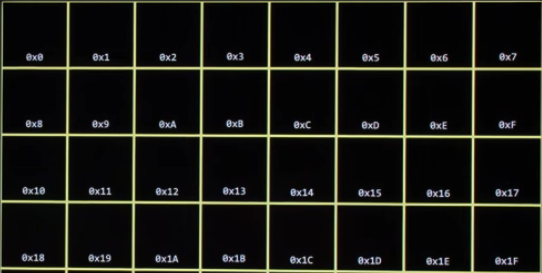
IN computer the memory location are referred in Hexadecimal. So per convention, any number using Hexadecimal notation has a 0x.
Code starting from addresses.c
- integer tends to be 4 bytes (32bits)
#include <stdio.h>
#include <cs50.h>
int main(void)
{
	int n = 50;
	printf("%i\n",n);
}
New terminology:
&If we prefix a variable with&nit gives the address in memory where the variable is stores%ppercent p to print an address of something in the computer's memory
#include <stdio.h>
#include <cs50.h>
int main(void)
{
	int n = 50;
	printf("%p\n",&n);
}
Memory Segment in C:
Memory management is one of the core concept in C , and it is essential to understand it to the core.
Memory can be structure in this way:
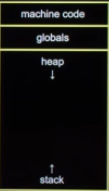
- Machine code (binary) is when the code is compiled by an application
- If the program/application has any GLOBAL variable , they finish under the machine code
- Heap is what
mallocuses and it grows downwards;- Grown top to botton
- The stack is the area of memory used by local var / functions ;
- Grows bottom to top
Pointers:
Core topic in C!
A pointer is a variable that can store in address. (Address is referred as memory address)
A pointer is 8-byte by default
#include <stdio.h>
#include <cs50.h>
int main(void)
{
	int n = 5;
	int *p = &n;
	print(%p/n, p);
}
- Declare variable n that stores the value 5;
- Declare another variable and put the address of n in *p; (also called a pointer to an integer)
-
- p stores the address of n, not the integer per se;
- Any datatype that has * p is referred as a pointer that stores the address of the variable
#memory
!Fact : Every time I run the program the memory address changes, this is because modern OS use Address Space Layout Randomization (ASLR), a security feature that randomizes the base address of the stack every time a program runs. Since local variables like n are stored on the stack, their virtual memory addresses will differ between executions to prevent attackers from predicting memory layouts for exploits like buffer overflows.
- Virtual Addresses:
printfwith%pprints virtual addresses, not physical RAM locations, which are managed by the Memory Management Unit (MMU). - Stack Randomization: The stack, where automatic local variables reside, is specifically targeted by ASLR to shift its position in the virtual address space.
Pointer Specs --> In C, the asterisk * sign means:
- Pointer Declaration: In a variable declaration (
int *ptr), it indicates that the variable is a pointer that stores the memory address of another variable. - De-reference (Indirection) Operator: When used with an existing pointer variable (e.g.,
*ptr), it accesses the value stored at the memory address held by the pointer.
De-referencing:
Checking at the previous code
#include <stdio.h>
#include <cs50.h>
int main(void)
{
	int n = 5;
	int *p = &n;
	print(%i/n, *p); //Using * sign to dereferece
}
In de-referencing rather than printing the address, we ask to print what is contained in the specific address.
Memory with string type:
#include <stdio.h>
#include <cs50.h>
int main(void)
{
	string s = "Hi!";
   // string *p = &s;
    printf("%p\n", s);
    printf("%p\n", &s[0]);
    printf("%p\n", &s[1]);
    printf("%p\n", &s[2]);
}
Why using & sign for each character of the string s but not while printing the s varibale?
- Because s has an allocated address in memory, but at the same time the first character of the s string has the same address. (So there is the beginning of the address , and the end of the address with the [NULL terminator](CS101/CS50/2. Arrays/C - lecture 2) )
Proof Check here:
cs50/c/lec4memory/ $ make addresses2
cs50/c/lec4memory/ $ ./addresses2

0x590f114f4004
0x590f114f4004
0x590f114f4005
0x590f114f4006
Also, a string is just a collection of char.
string s = "Hi!";
is equal to:
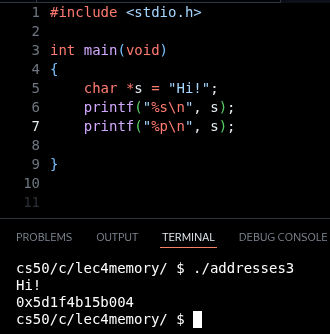
char *s = "Hi!";
proof:
We explained the there is a datatype called typedef that can be used to create customised datatypes:
typedef char* string;
This means the string data type is actually a collection of chars, check:
We can also do arithmetic operations to print out addresses:
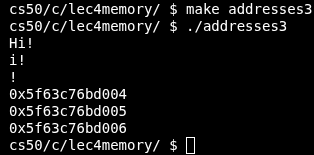
Pointer arithmetic:
#include <stdio.h>
#include <cs50.h>
int main(void)
{
	char *s = "HI!";
	// Print whole string
	printf("%s\n", s);
	// Print from index 1 onwards
	printf("%s\n", s + 1);
	// print from index 2 onwards
	printf("%s\n", s + 2);
	// Print memory address
	printf("%p\n", s);
	printf("%p\n", s+1);
	printf("%p\n", s+2);
}
which gives:
Copy & malloc:
Note that in C, when there is a variable containing a string OR a set of characters, the first character contains the address of the memory.
#include <stdio.h>
#include <cs50.h>
#include <string.h>

main int(void)
{
    // User input to a string
    char *s = get_string("s: ");
    //Save the address of s in t
    char *t = s;
}
where:
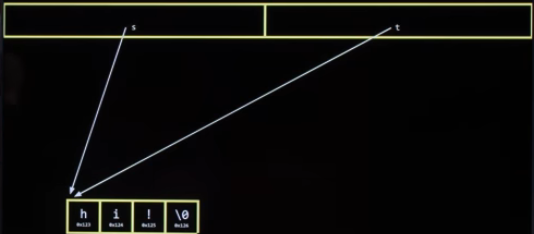
Both pointing at the same chunk of memory.
So if I was to change the character to uppercase in s, the same would happen to t because they are pointing at the same thing.
#include <stdio.h>
#include <cs50.h>
#include <string.h>

main int(void)
{
    // User input to a string
    char *s = get_string("s: ");
    //Save the address of s in t
    char *t = s;

	printf("%s\n", s);
	// switch to uppercase index 0
	s[0] = toupper(s[0]);
	printf("%s\n", s);
	printf("%c\n", s[0]);
	printf("%c\n", t[0]);
}
which is:
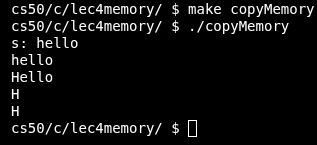
malloc: Memory allocation
2 keywords:
- malloc --> allocate memory
- free --> free memory
#include <stdio.h>
#include <cs50.h>
#include <ctype.h>
#include <string.h>
#include <stdlib.h>

//Declare main function
int main(void)
{
    //Get user input
    char *s = get_string("s: ");

    //Allocate memory
    char *t = malloc(strlen(s) + 1);

    // copy every character from s to t
    for (int i = 0, n = strlen(s); i <= n; i++)
    {
        t[i] = s[i];
    }

    printf("%s\n", s);
    printf("%s\n", t);

}
#include <stdlib.h>header to use the memory allcoation (malloc) function- variable
sgets user input - in variable t -->
char *t = malloc(strlen(s) + 1);- use
mallocfunction that assigns memory equal to the length of variable s malloc(strlen(s))- +1 to include the null character every string has
- use
- for loop that iterates through s and hard codes every character to t
The alternative to hardcoding this is, using the strcpy function, where:
strcpy(destination, source)
#include <stdio.h>
#include <cs50.h>
#include <ctype.h>
#include <string.h>
#include <stdlib.h>

//Declare main function
int main(void)
{
    //Get user input
    char *s = get_string("s: ");

    //Allocate memory
    char *t = malloc(strlen(s) + 1);

    // strcpy function
    strcpy(t,s);

    printf("%s\n", s);
    printf("%s\n", t);
}
Whenever we use malloc, we should free the memory that we have assigned to a variable:
#include <stdio.h>
#include <cs50.h>
#include <ctype.h>
#include <string.h>
#include <stdlib.h>

//Declare main function
int main(void)
{
    //Get user input
    char *s = get_string("s: ");

    //Allocate memory
    char *t = malloc(strlen(s) + 1);

    // strcpy function
    strcpy(t,s);

    printf("%s\n", s);
    printf("%s\n", t);

    //free the memory
    free(t);
}
A good practice is to always check with conditional statements if there are NULL values while using malloc, because of:
- empty strings
- wrong typos
#include <stdio.h>
#include <cs50.h>
#include <ctype.h>
#include <string.h>
#include <stdlib.h>

//Declare main function
int main(void)
{
    //Get user input
    char *s = get_string("s: ");
    if (s == NULL)
    {
        return 1;
    }

    //Allocate memory
    char *t = malloc(strlen(s) + 1);
    if (t == NULL)
    {
        return 1;
    }
    // use string copy function
    strcpy(t,s);
    printf("%s\n", s);
    printf("%s\n", t);

    //free memory
    if (strlen(t) > 0)
    {
        printf("Variable has memory, clearing up..\n");
        free(t);
    }
    else
    printf("No memory leaks!");
}
#sizeof
Assign memory to integers
int main(void)
{
	int *x = malloc(3*sizeof(int));

	x[0] = 10;
	x[1] = 11;
	x[2] = 12;
}
- x is a pointer to an integer
- get space for 3 integers through
malloc sizeofoperator to assign specific memory space based on data type:- int = 4 bytes
- char = 1 byte
Variable scope:
consider the code and how the stack is used:
void swap(int a, intb)
{
	int tmp = a;
	a = b;
	b = tmp;
}
User input , scanf() :
In this block of code we stop using the CS50.h library and start addressing classic C syntax.
- To take as an input an integer:
#include <stdio.h>
#include <stdlib.h>

int main(void)
{
    // Scanner to take user input as an integer
    int n;
    printf("n: ");
    scanf("%i", &n);
    printf("%i\n",n);
}
- Declare variable type and name;
- Use
scanf("%i, &n")where&nallows the function to retrieve the address where the value is stored
!IMPO:
scanf does not take a variable name and prints its content. It points at the address there the value is stored and returns it's content.
- Take a string as an input
#include <stdio.h>
#include <stdlib.h>

int main(void)
{
    // Scanner to take user input as an integer
    char *s = malloc(1);
    // NOTE: char *s; would not work
    printf("s: ");
    scanf("%s", s);
    printf("%s\n",s);
}
Here in line 9, I don't need the &s because by definition the first char of a string points to its address. So in this case it's automatically retrieved.
- At line 7 we need declare how much memory we want to assign and where to look at.
- Only
char *s;won't work because the program does not know how many characters of a string the user will put in. - Without
malloc,sis an uninitialised pointer. It points to a completely random address in memory. Trying to write to a random address will almost always cause an immediate crash
!proof:
#valgrind
Using Valgrind to check how the binary code is running in the system.
valgrind ./getString
Check here the code and errors:
- I allocated exactly 1 byte of memory on the Heap (
malloc(1)). - If I type "hello" , it requires 6 bytes of memory.
- It needs 5 bytes for the letters
h,e,l,l,o, plus 1 byte for the invisible null terminator (\0) that marks the end of a string in C.
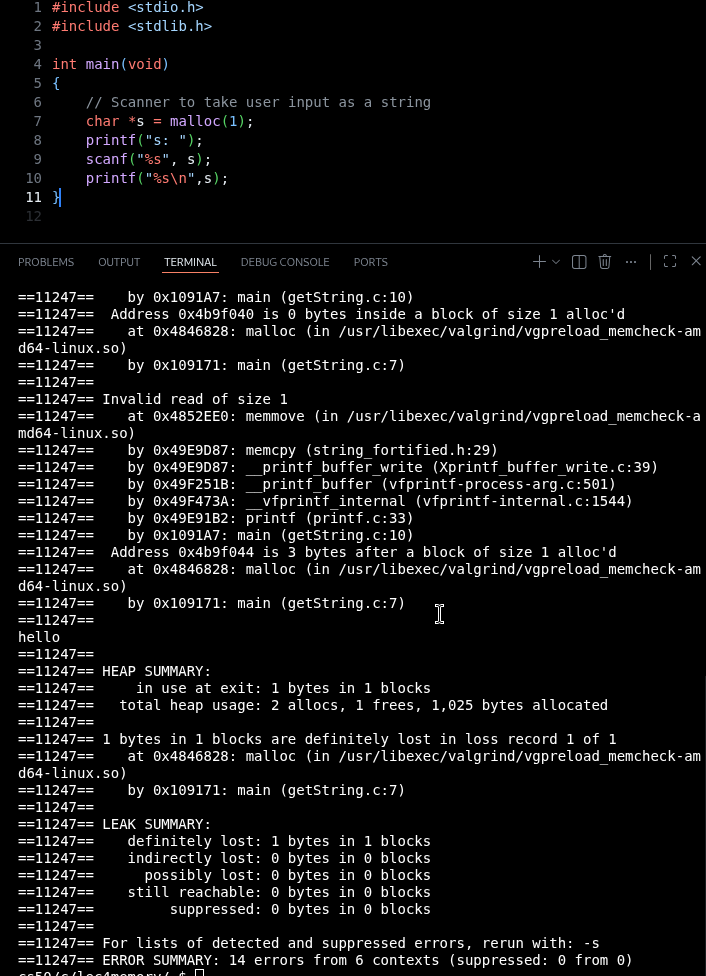
#bufferoverflow
What happened in memory: (Buffer Overflow problem)
- I typed "hello" and
printfwrote all 6 bytes in 1 byte space. - first letter
hgoes into the allocated memorymalloc(1) - The remaining bytes overwrite whatever random data sits next to the allocation on the heap.
- Memory was not freed either!
This is called a Buffer Overflow. If those overwritten bytes belong to something critical, the operating system will step in and immediately crash my program with a Segmentation fault.
CORRECT USAGE:
#include <stdio.h>
#include <stdlib.h>

int main(void)
{
    // Scanner to take user input as an integer
    char *s = malloc(4);
    // NOTE: char *s; would not work
    printf("s: ");
    scanf("%s", s);
    printf("%s\n",s);

    free(s);
}
execution:
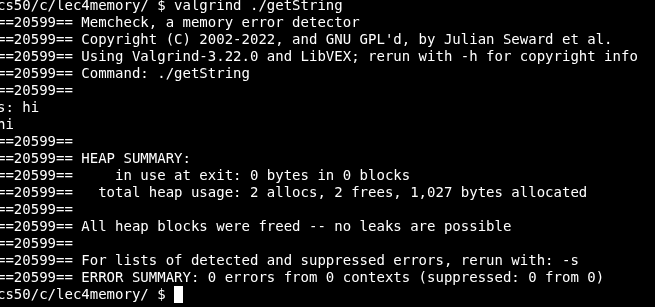
File I/O:
Different file handling options:
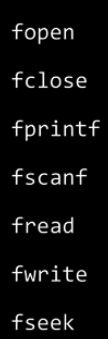
There are various modes in which a file can be opened. The following are the different file opening modes:
| Mode | Description |
|---|---|
| r | Opens an existing text file for reading purposes. |
| w | Opens a text file for writing. If it does not exist, then a new file is created. Here your program will start writing content from the beginning of the file. |
| a | Opens a text file for writing in appending mode. If it does not exist, then a new file is created. Here your program will start appending content in the existing file content. |
| r+ | Opens a text file for both reading and writing. |
| Opens a text file for both reading and writing. It first truncates the file to zero length if it exists, otherwise creates a file if it does not exist. | |
| a+ | Opens a text file for both reading and writing. It creates the file if it does not exist. The reading will start from the beginning but writing can only be appended. |
| code: |
#include <stdio.h>
#include <cs50.h>
#include <stdlib.h>
#include <string.h>

int main(void)
{
    // open a new file
    FILE *file = fopen("random.txt", "w");

}
While working with file handling, we need a file pointer to store the reference of the FILE structure returned by the fopen() function. The file pointer is required for all file-handling operations.
The fopen() function and contains attributes such as the file descriptor, size, and position, etc.
Declare a file pointer:
FILE *file_name;
fopenis opening a file called "random.txt" , in write mode- return value is stored in a variable called file (struct) , it gives a pointer to a file
#include <stdio.h>
#include <stdlib.h>
#include <string.h>

int main(void)
{
    // open a new file
    FILE *file = fopen("random.txt", "w");

    //Create a variable with 50bytes
    char *s = malloc(50);

    //Ask user to add a line to the file
    printf("Text: ");
    scanf("%s", s);

    // save to the file (; is the separator)
    fprintf(file, "%s;\n", s);

	//close file
    fclose(file);

	//free up memory
    free(s);
}
IN write mode, the file gets re-written every time, so it's not persistent.
We append:
#include <stdio.h>
#include <stdlib.h>
#include <string.h>

int main(void)
{
    // open a new file
    FILE *file = fopen("random.txt", "a");

    //Create a variable with 50bytes
    char *s = malloc(50);

    //Ask user to add a line to the file
    printf("Text: ");
    scanf("%s", s);

    // save to the file (; is the separator)
    fprintf(file, "%s;\n", s);

	//close file
    fclose(file);

	//free up memory
    free(s);
}
This is incomplete! The program appends only one word at a time, and whenever there is a space character, it stops writing.
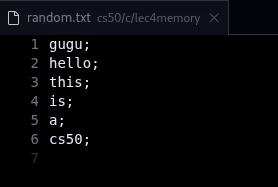
Technical review: fopen vs open
The key difference between fopen() and open() in Linux is that open() is a low-level system call that returns a file descriptor (integer), while fopen() is a higher-level C library function that internally calls open() and returns a FILE pointer with additional buffering capabilities.
#systemcall
A system call requires the CPU to switch from user mode to kernel mode, perform the operation, and switch back.
In C fopen is a library function call , which means fopen has been defined in a header file , you can simply write it in your program by taking it's header file and it is dependent on library function .
open is also used by giving it's appropriate header file but,it is totally system dependent ,as it has been defined for the use of Unix based system , and it directly interacts with the kernel.
- Buffering: FILE pointers include automatic buffering for performance, while file descriptors are unbuffered and pass data directly to the kernel.
Example code:
fd = Open("file",Mode);
If you want to read a file by single character. The syntax for reading like above your system call will increase according to file's content.
fd = open("file", O_RDONLY);
read(fd, buffer, 1);
If file contains 10,000 characters, this approach forces the operating system to perform 10,000 separate system calls. The time spent switching modes often exceeds the time spent actually reading the data, causing the program to run significantly slower as the file size increases.
(The solution would be to hardcode a bigger buffer_size)
#define BUFFER_SIZE 4096
int main()
{
	int fd = open("file.txt", O_RDONLY);
	if (fd == -1) return 1;
	char buffer[BUFFER_SIZE];
	ssize_t bytes_read;
But using fopen then we have only one system call:
When you open a file using fopen(), the C standard library allocates a memory buffer (typically 4KB to 8KB, depending on the system) associated with that FILE pointer.
*Portability
fopen is library function call and it has been defined in appropriate headers file so it is present in every system whether it is Unix or other OS having c installation.
But open is a system call and it is only for Unix based Operating systems.
So if you have written any code using fopen then you can easily run it either on Unix based os or on other OS of c platforms.
Raw implementation of the Linux cp copy command:
include <stdio.h>

//Data type to read raw bytes
typedef unsigned char BYTE;

// Main function takes arguments
int main(int agrc , char *argv[])
{
    FILE *src = fopen(argv[1], "r");
    FILE *dst = fopen(argv[2], "w");

    BYTE b;

    while(fread(&b, sizeof(b), 1, src) != 0)
    {
        fwrite(&b, sizeof(b), 1, dst);
    }

    fclose(src);
    fclose(dst);
}
Breakdown:
int main(int argc, int argv[]
{
    FILE *src = fopen(argv[1], "r");
    FILE *dst = fopen(argv[2], "w");
}
The main function takes 2 command line arguments, which could be source of the file to copy and destination of the file to be written.
- src opens the file to read the source
- dst open the file to write from the source
typedef unsigned char BYTE;
Create a datatype called BYTE , where:
- is of type
char, as a char is 1 byte unsignedkeyword tells the system that the sequence of 8-bits cannot be interpreted as a negative number. (Because here we are not treating numbers)
    BYTE b;

    while(fread(&b, sizeof(b), 1, src) != 0)
    {
        fwrite(&b, sizeof(b), 1, dst);
    }

    fclose(src);
    fclose(dst);
}
- Define a byte called b
- loop through the file (While I can read 1 byte at a time)
fread(&b)--> reading through the bitessizeof(b)--> the size of BYTE (8-bits)- 1 byte at a time
- into the source
fwritedoes the same thing (Write into this file 1 byte at a time)- Close both files