RemoteDesktopProtocol
Remote Desktop Protocols in Linux
Remote desktop protocols are used to provide graphical remote access to a system.
Two of the most common protocols for this type of access are:
Remote Desktop Protocol(RDP): Primarily used in Windows environments. RDP allows administrators to connect remotely and interact with the desktop of a Windows machine as if they were sitting right in front of it.Virtual Network Computing(VNC): A popular protocol in Linux environments, although it is also cross-platform. VNC provides graphical access to remote desktops, allowing administrators to perform tasks on Linux systems in a similar way to RDP on Windows.
Think of remote desktop protocols like having different sets of keys for different types of buildings. RDP is like having a key specifically made for Windows buildings, allowing you to access and manage the rooms (desktops) remotely, as if you were inside. VNC, on the other hand, is more like a universal key that can work on many buildings, but it’s often used for Linux structures.
XServer
#x11
When a desktop is started on a Linux computer, the communication of the graphical user interface with the operating system happens via an X server.
The X11 is a fixed system that consists of a collection of protocols and applications that allow us to call application windows on displays in a graphical user interface.
This protocol mainly uses TCP/IP as a transport base but can also be used on pure Unix sockets. The ports that are utilized for X server are typically located in the range of TCP/6001-6009, allowing communication between the client and server. When starting a new desktop session via X server the TCP port 6000 would be opened for the first X display :0.
X11's significant disadvantage is the unencrypted data transmission. However, this can be overcome by tunneling the SSH protocol.
Allow X11 forwarding in the SSH configuration file (/etc/ssh/sshd_config) on the server that provides the application by changing this option to yes.
X11Forwarding
For this, we have to allow X11 forwarding in the SSH configuration file (/etc/ssh/sshd_config) on the server that provides the application by changing this option to yes.
cat /etc/ssh/sshd_config | grep X11Forwarding
X11Forwarding yes
With this we can start the application from our client with the following command:
sosoBoy@htb[/htb]$ ssh -X htb-student@10.129.23.11 /usr/bin/firefox
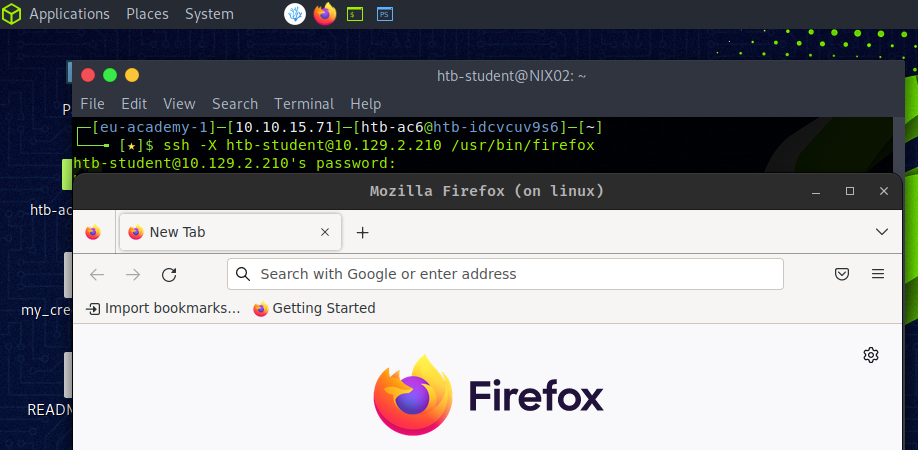
X11 is not a secure protocol by default because its communication is unencrypted. As such, we should pay attention and look for the those TCP ports (6000-6010) when we deal with Linux-based targets.
An attacker could potentially intercept sensitive information, such as passwords or personal data, by simply using standard X11 tools like xwd (which captures screenshots of X windows) and xgrabsc.
XDMCP
The X Display Manager Control Protocol (XDMCP) protocol is used by the X Display Manager for communication through UDP port 177 between X terminals and computers operating under Unix/Linux.
VNC
#vnc
Virtual Network Computing (VNC) is a remote desktop sharing system based on the RFB protocol that allows users to control a computer remotely.
It allows a user to view and interact with a desktop environment remotely over a network connection.
This is also one of the most common protocols for remote graphical connections for Linux hosts.
VNC server listens on TCP port 5900. So it offers its display 0 there. Other displays can be offered via additional ports, mostly 590[x], where x is the display number. Adding multiple connections would be assigned to a higher TCP port like 5901, 5902, 5903, etc.
!Check VNC setup tutorial