FilePermissions
Linux file permissions
When typed ls -l , the shell provides a list of all the files. It shows something like this:
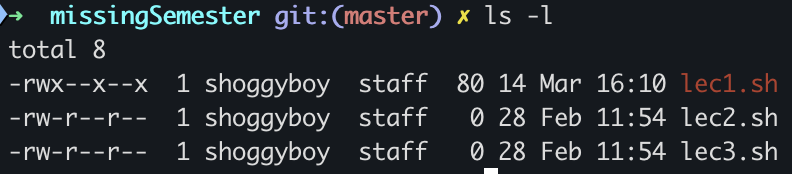
- File type:
-for files ordfor directories - Permission settings:
rw-r--r--root, user , group- The first set of permissions applies to the owner of the file.
- The second set of permissions applies to the user group that owns the file.
- The third set of permissions is generally referred to as "others."
*When permissions and users are represented by letters, that is called symbolic mode. For users, u stands for user owner, g for group owner, and o for others.
When Linux file permissions are represented by numbers, it's called numeric mode.
In numeric mode, a three-digit value represents specific file permissions (for example, 744.) These are called octal values. The first digit is for owner permissions, the second for group permissions, and the third for other users.
| Symbolic mode | Numeric mode |
|---|---|
r Readw Writex Execute | - r (read): 4 - w (write): 2 - x (execute): 1 |
Essential Keywords
| systemctl | System control gives control over the system, such: - enable, disable - Start, stop | Example: |
|---|---|---|
| frewall-cmd | Firewall command | |
| ss / netstat | Socket status / Network status | ss -l Show only listening portss -tul Show only socket listening for TCP, UDPss -tulp Show only socket listening for TCP, UDP and which process |