C - lecture 2
Debugging
Whenever you want to find logical flows in the code, use always printf as a debugging tool to check how the code behaves.
Compiling
make is a command that compiles the source code into machine code, but make is not the compiler.
The actual compiler is called clang, so instead of using make hello , we use:
#include <stdio.h>

int main(void)
{
	printf('hello')
}
and run:
cs50/c/lec2/ $ clang name.c
cs50/c/lec2/ $ ls
a.out*  name*  name.c
This outputs a assembly.output file
with #include <cs50.h> library clang will return error:
cs50/c/lec2/ $ clang name.c
/usr/bin/ld: /tmp/name-3c3e1b.o: in function `main':
name.c:(.text+0x16): undefined reference to `get_string'
clang: error: linker command failed with exit code 1 (use -v to see invocation)
This is mainly because we think clang knows where to find the CS50 library , but that's not a standard library frequently used. It's being used for the time being , because we are fairly new to C.
When source code get processed into machine code, it goes though:
- preprocessing : header file function added to the main function
- compiling : source code to assembly code
- assembling : conversion to binary + combine header file codes
- linking : all the converted binary code are linked together
C data types:
- bool - 1 byte
- int - 4 byte (4 billions)
- long - 8 byte
- float - 4 byte (real numbers with decimal points)
- double - 8 byte
- char - 1 byte
- string - Depends on the lenght of the string
When we store value in memory all we are doing is memory in the hardware like this:
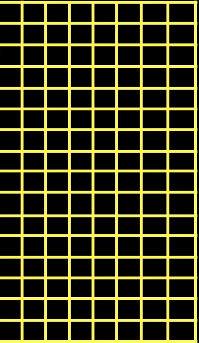
so for the code :
#include <stdio.h>
#include <cs50.h>
int main(void)
{
	int score1 = 72;
	int score2 = 73;
	int score3 = 33;
}
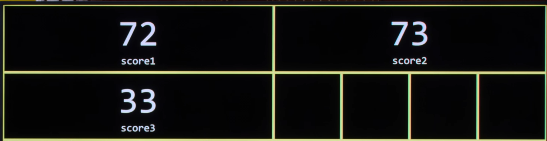
we would use 4 byte of each integer , so 12 bytes in total:
Arrays
We can use arrays, which are a chucks of contiguous memory. (Back to back)
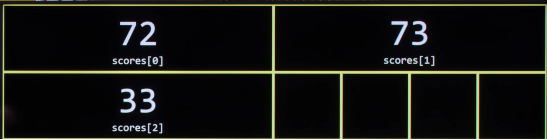
In C we have to declare the block of memory we want to declare our variables in:
int scores[3]; // Declare array

scores[0] = 1; // Set element at each indices
scores[1] = 2;
scores[2] = 3;
Ask user's input
#include <stdio.h>
#include <cs50.h>
int main(void)
{
	int scores[2];

	scores[0] = get_int("Number 1: \n");
	scores[1] = get_int("Number 2: \n");

	printf("%f\n", scores[0] + scores[1]);
}
Functions
When we create a function in C, that takes an array as input:
- we have to declare the
lenghtof the array as input - We need to pass to array itself
- specify type of value
- whatever we want to name the array inside the function
- empty []
#include <stdio.h>
#include <cs50.h>

float average(int lenght, int numbers[])
{
	for (int i; i < lenght; i++)
	{
		scores[i]
	}
}
Char , String
#include <stdio.h>
#include <cs50.h>
int main(void)
{
	char c1 = 'H';
	char c2 = 'i';
	char c3 = '!';

	printf("%i % i %i\n", c1 ,c2,c3);
}
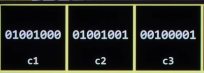
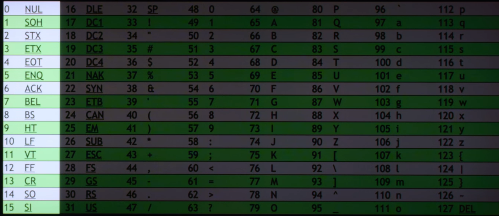
The format code %i for integers casts automatically the c1. c2. c3 values and allocates in memory such as (ASCII):
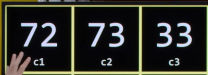
equal to binary:
String
#include <stdio.h>
#include <cs50.h>
int main(void)
{
	string s = "Hi!";
	printf("%s\n", s);
}
Hi! is 3 bytes of memory
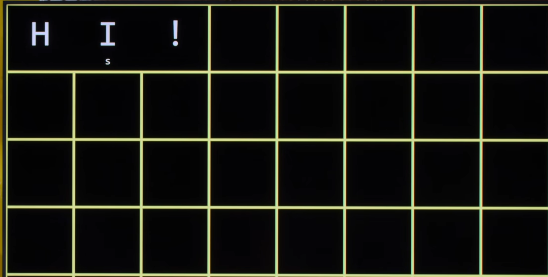
or an array of char
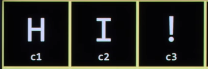
If we want to check the value for each element of the string, we can change the format
from %s string to %i integer.
#include <stdio.h>
#include <cs50.h>
int main(void)
{
	string s = "Hi!";
	printf("%i %i %i\n", s[0], s[1], s[2]);
}
#NULLterminator
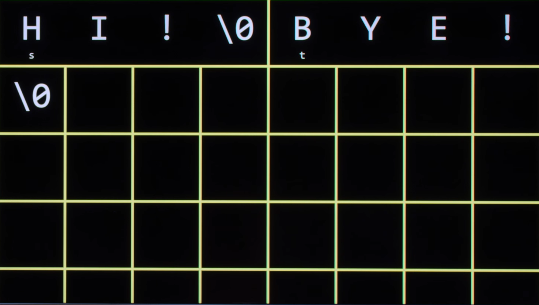
A string of length 3 takes exactly 4 bytes., with the last being a NULl byte which tells printf the string has finished
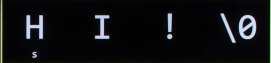
Any extra %i no corresponding to a value will take a 0 byte space in memory.
[NULL character]
Is just a byte of 0 bit, it represents the end of a string.
ASCII TABLE:
an extra variable like string t = "BYE!" would take 5 bytes in total.
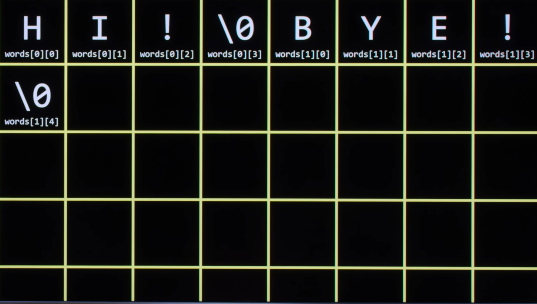
We can also create an array containing words and access both elements and sub elements:
#include <stdio.h>
#include <cs50.h>
int main(void)
{
	string s = "HI!";
	string t = "BYE!";
	string words [2];

	printf("%i %i %i\n", s[0], s[1], s[2]);
	printf("%s\n" , t);

	words[0] = "Hi!";
	words[1] = "Bye!";
	printf("%s %s\n", words[0], words[1]);

	// Access sub-index of an index
	printf("%c\n", words[0][1]);
}
And it would be like:
Length of an array:
!VERY MECHANICAL
#include <stdio.h>
#include <cs50.h>
int main(void)
{
	string name = get_string("What is your name? \n");
	int n = 0;
	while (name[n] != '\0')
	{
	n++;
	}
	printf("%i\n", n);

}
- n contains the length of the string
- the loop checks that each at name[n] n-ith position is different than a NUL character denoted by
\0 - Increment the value of the index
n - prints final value which is the lenght of the var
Alternative
-
Include
#include <string.h>library (new library) -
use
strlen()function -
When printing use
%lulong unassigned.
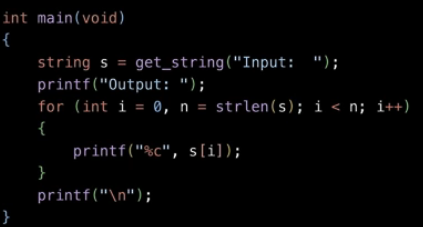
Or use like this inside a for loop
-
Where
int i = 0is initialized once; -
The data type declaration happens only once, during initialization
-
We can declare another variable inside the loop that stores the len of the string
Uppercase
The #include <ctype.h> header allows to convert char to upper or lowercase automatically.
This is not like a Python function that takes the whole string and converts it, but I have to run a for loop that converts character per character.
#include <stdio.h>
#include <cs50.h>
#include <string.h>
#include <ctype.h>

int main(void){

	string s = get_string("What is the string: ");
	int n = strlen(s);
	for (int i = 0; i < n; i++)

	{
		printf("%c", toupper(s[i]));
	}
	printf("\n");
}