Wilcards&Arithmetics
Wildcards are used in Bash for pattern-matching search.
The three main wildcard characters are:
- Star or Asterisk ( * ) matches one or more occurrences of any character, including no character.
- Question mark (?) represents or matches a single occurrence of any character.
- Square brackets ([]) matches any occurrence of character enclosed in the square brackets. It is possible to use different types of characters (alphanumeric characters): numbers, letters, other special characters etc.
Arithmetic Operators
| Operator | Description |
|---|---|
+ | Addition |
- | Subtraction |
* | Multiplication |
/ | Division |
% | Modulus |
variable++ | Increase the value of the variable by 1 |
variable-- | Decrease the value of the variable by 1 |
Arithmetic.sh
#!/bin/bash

increase=1
decrease=1
echo "Addition: 10 + 10 = $((10 + 10))"
cho "Subtraction: 10 - 10 = $((10 - 10))"
echo "Multiplication: 10 * 10 = $((10 * 10))"
echo "Division: 10 / 10 = $((10 / 10))"
echo "Modulus: 10 % 4 = $((10 % 4))" ((increase++))

echo "Increase Variable: $increase" ((decrease--))
echo "Decrease Variable: $decrease"
The output of this script looks like this:
#!/bin/bash

sosoBoy@htb[/htb]$ ./Arithmetic.sh
Addition: 10 + 10 = 20
Subtraction: 10 - 10 = 0
Multiplication: 10 * 10 = 100
Division: 10 / 10 = 1
Modulus: 10 % 4 = 2
Increase Variable: 2
Decrease Variable: 0
We can also calculate the length of the variable. Using this function ${#variable}, every character gets counted, and we get the total number of characters in the variable.
VarLength.sh
htb="HackTheBox"
echo ${#htb}

sosoBoy@htb[/htb]$ ./VarLength.sh
10
Example of script:
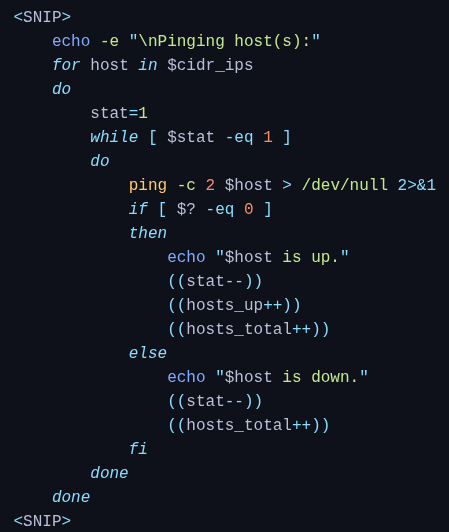
- Action: Iterates through every IP address stored in the variable
$cidr_ips. - Context:
$cidr_ipsis assumed to be a list of IP addresses generated earlier in the script (likely from a CIDR range, to be reviewed). - Variable: In each iteration, the current IP address is assigned to the variable
$host
Inner loop:
ping: Sends network packets to test connectivity.-c 2: Sends exactly 2 packets (count) and then stops.$host: The target IP address.> /dev/null 2>&1: Suppresses all output.
> /dev/null: Discards standard output (the normal ping results).
2>&1: Redirects standard error (error messages) to the same place as standard output (which is discarded).