InputOutput
We may get results from our sent requests and executed commands, which we have to decide manually on how to proceed.
cidr.sh
#!/bin/bash

echo -e "Additional options available:"
echo -e "\t1) Identify the corresponding network range of target domain."
echo -e "\t2) Ping discovered hosts."
echo -e "\t3) All checks."
echo -e "\t*) Exit.\n"

read -p "Select your option: " opt

case $opt in
    "1") network_range ;;
    "2") ping_host ;;
    "3") network_range && ping_host ;;
    "*") exit 0 ;;
esac
!NOTE
The -e flag in the Linux echo command enables the interpretation of backslash escapes within the string being printed. Without this flag, echo treats backslashes literally; with it, special characters are converted into their intended control functions.
Common escape sequences supported by echo -e include:
\n: Inserts a new line.\t: Inserts a horizontal tab.\b: Moves the cursor back one character (backspace).\r: Moves the cursor to the beginning of the line (carriage return).\a: Produces an alert (bell sound).\e: Inserts an escape character (often used for terminal color codes).
For example, echo -e "Hello\nWorld" prints "Hello" and "World" on separate lines, whereas echo "Hello\nWorld" prints the text exactly as written with the literal characters \n.
read -p "Select your option: " opt
the additional option -p ensures that our input remains on the same line.
- Our input is stored in the variable
opt, - which we then use to execute the corresponding functions with the
casestatement - Depending on the number we enter, the
casestatement determines which functions are executed.
Output:
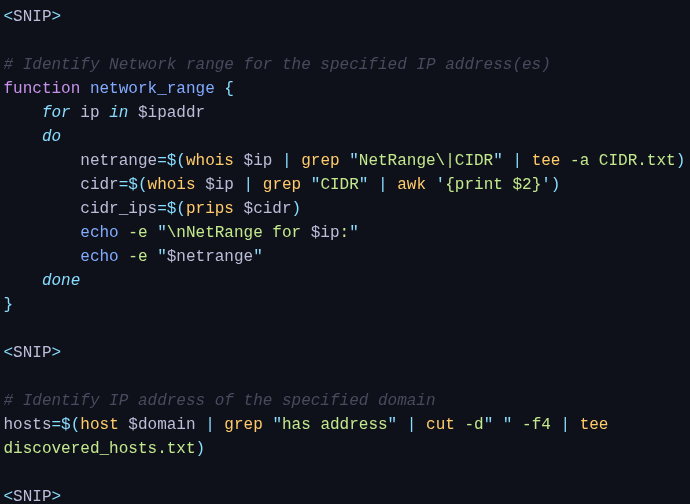
When using tee, we transfer the received output and use the pipe (|) to forward it to tee.
#tee
The most basic usage of the tee command is to display the standard output (stdout) of a program and write it to a file.
Example:
➜  ~ df -h | tee usage.txt

Filesystem       Size   Used  Avail Capacity iused     ifree %iused  Mounted on
/dev/disk1s5s1  233Gi   14Gi   48Gi    24%  502388 504039040    0%   /
devfs           337Ki  337Ki    0Bi   100%    1164         0  100%   /dev
/dev/disk1s4    233Gi  4.0Gi   48Gi     8%       5 504039040    0%   /System/Volumes/VM
/dev/disk1s2    233Gi  433Mi   48Gi     1%    2701 504039040    0%   /System/Volumes/Preboot
/dev/disk1s6    233Gi  6.2Mi   48Gi     1%      18 504039040    0%   /System/Volumes/Update
/dev/disk1s1    233Gi  165Gi   48Gi    78% 3441348 504039040    1%   /System/Volumes/Data
map auto_home     0Bi    0Bi    0Bi   100%       0         0  100%   /System/Volumes/Data/home
The "-a / --append" parameter ensures that the specified file is not overwritten but supplemented with the new results. At the same time, it shows us the results and how they will be found in the file.
sosoBoy@htb[/htb]$ cat discovered_hosts.txt CIDR.txt

165.22.119.202
NetRange:       165.22.0.0 - 165.22.255.255
CIDR:           165.22.0.0/16`