Network Torubleshooting
Network troubleshooting is an essential process that involves diagnosing and resolving network issues that can adversely affect the performance and reliability of the network.
Some of the most commonly used tools include:
- Ping
- Traceroute
- Netstat
- Tcpdump
- Wireshark
- Nmap
ping
is a command-line tool used to test connectivity between two devices. It sends packets to a remote host and measures the time to return them.
ping 8.8.8.8
(Pining google DNS server, sends ICMP packets)
traceroute
traces the route packets take to reach a remote host. It sends packets with increasing Time-to-Live (TTL) values to a remote host and displays the IP addresses of the devices that the packets pass through.
traceroute www.inlanefreight.com
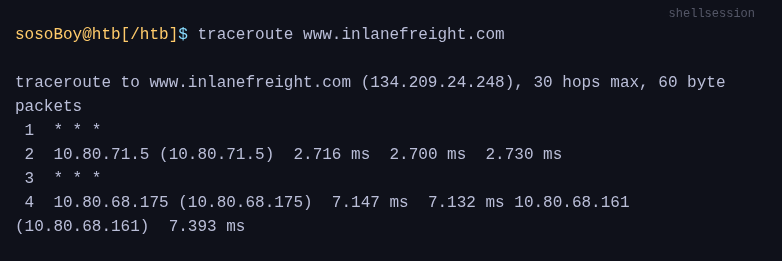
It displays the IP addresses of all intermediary devices the packets traverse. Each line of the traceroute output contains valuable information, offering insights into the network route and performance.
In this example, the destination host is 134.209.24.248, and the maximum number of hops allowed is 30.
The second line shows the first hop in the traceroute, which is the local network gateway with the IP address 10.80.71.5, followed by the next three columns show the time it took for each of the three packets sent to reach the gateway in milliseconds (2.716 ms, 2.700 ms, and 2.730 ms).
Next, we see the second hop in the traceroute. However, there was no response from the device at that hop, indicated by the three asterisks instead of the IP address. This could mean the device is down, blocking ICMP traffic, or a network issue caused the packets to drop.
netstat
is used to display active network connections and their associated ports. It can be used to identify network traffic and troubleshoot connectivity issues.
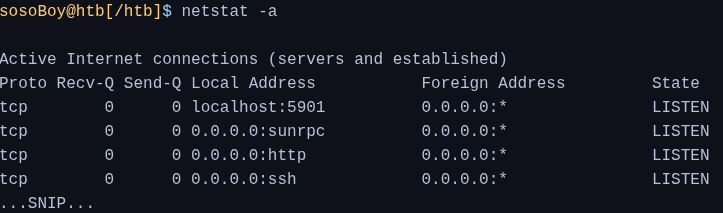
This includes:
- protocol used,
- the number of bytes received and sent, I
- P addresses,
- port numbers of both local and remote devices,
- and the current connection state.
By knowing which ports are used by which services, users can quickly identify any network issues and troubleshoot accordingly.
The most common network issues we will encounter during our penetration tests are as follows:
| most common network issues | most common causes |
|---|---|
| - Network connectivity issues - DNS resolution issues (it's always about DNS) - Loss of data packets - Network performance issues | - Incorrectly configured firewalls or routers, - damaged network cables or connections, - incorrect network settings, - hardware failures, - incorrect DNS server settings or DNS server failures - incorrectly configured DNS entries, - network congestion, - outdated network hardware or incorrectly configured network settings, - unpatched software or firmware and missing security controls. |