Block Devices
The command: lsblk
lsblk stands for "list block devices". Block devices are storage devices your system sees as a sequence of bytes — things like hard drives, SSDs, NVMe drives, USB sticks, SD cards.
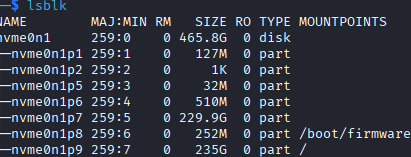
Without any flags, lsblk shows a basic tree of your storage devices and their partitions.
The -f flag extends this with filesystem information.

What -f adds:
| Column | Meaning |
|---|---|
FSTYPE | Filesystem type (ext4, vfat, btrfs, etc.) |
FSVER | Filesystem version |
LABEL | Human-readable name given to the partition |
UUID | Unique ID the OS uses to identify the partition |
FSAVAIL | Available free space |
FSUSE% | Percentage of space used |
MOUNTPOINTS | Where it's mounted in the filesystem tree |
nvme0n1 : This is the entire NVMe SSD, just the container for all partitions below it.
nvme0n6 to nvme09 : There are partitions for both Raspbian and Kali OS:
- boot : The boot partition for your Kali Linux. Mounted at /boot/firmware, this is where the bootloader and kernel live.
- active Kali Linux root partition. This is where everything runs from