Conditional&Operators
#!/bin/bash
# Check for given argument
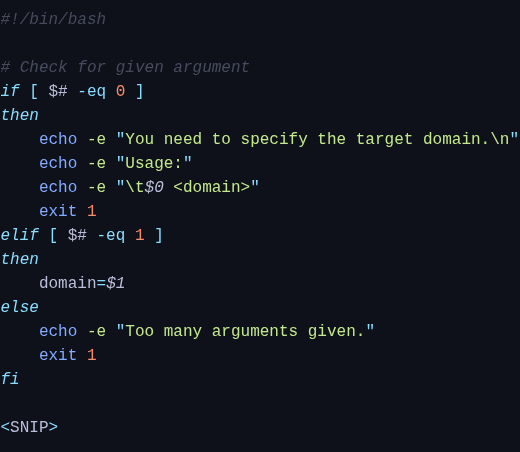
if [ $# -eq 0 ]
then
	echo -e "You need to specify the target domain.\n"
	echo -e "Usage:"
	echo -e "\t$0 <domain>"
	exit 1
else
	domain=$1
fi
#!/bin/bash- Shebang.if-else-fi- Conditional execution.echo- Prints specific output.$#/$0/$1- Special variables.domain- Variables.
Shebang
The shebang line is always at the top of each script and always starts with "#!". This line contains the path to the specified interpreter (/bin/bash) with which the script is executed. We can also use Shebang to define other interpreters like Python, and others.
#!/usr/bin/env python
If-Else-Fi
Checking of conditions usually has two different forms in programming and scripting languages, the if-else condition and case statements. In pseudo-code, the if condition means the following:
#!/bin/bash
if [ the number of given arguments equals 0 ]
then
    Print: "You need to specify the target domain."
    Print: "<empty line>"
    Print: "Usage:"
    Print: "   <name of the script> <domain>"
    Exit the script with an error
else
    The "domain" variable serves as the alias for the given argument finish the if-condition
By default, an If-Else condition can contain only a single "If", as shown in the next example.
if-only.sh
#!/bin/bash

value=$1
if [ $value -gt "10" ]
then
	echo "Given argument is greater than 10."
fi
execution:
bash if-only.sh 5
#!/bin/bash
sosoBoy@htb[/htb]$ bash if-only.sh 12

Given argument is greater than 10.
if-elif-else
When adding Elif or Else, we add alternatives to treat specific values or statuses. If a particular value does not apply to the first case, it will be caught by others.
Several Conditions - Script.sh
ASCII
represents a 7-bit character encoding. Since each bit can take two values, there are 128 different bit patterns, which can also be interpreted as the decimal integers 0 - 127 or in hexadecimal values 00 - 7F.
Comparison Operator
#bashoperators
To compare specific values with each other comparison operators are used to determine how the defined values will be compared. For these operators, we differentiate between:
stringoperatorintegeroperatorsfileoperatorsbooleanoperators
String Operators
If we compare strings, then we know what we would like to have in the corresponding value.
| Operator | Description |
|---|---|
== | is equal to |
!= | is not equal to |
< | is less than in ASCII alphabetical order |
> | is greater than in ASCII alphabetical order |
-z | if the string is empty (null) |
-n | if the string is not null |
It is important to note here that we put the variable for the given argument ($1) in double-quotes ("$1"). This tells Bash that the content of the variable should be handled as a string. Otherwise, we would get an error.
#!/bin/bash

# Check the given argument
if [ "$1" != "HackTheBox" ]
then
	echo -e "You need to give 'HackTheBox' as argument."
	exit 1
elif [ $# -gt 1 ]
then
	echo -e "Too many arguments given."
	exit 1
else
	domain=$1
	echo -e "Success!"
fi
Integer Operators
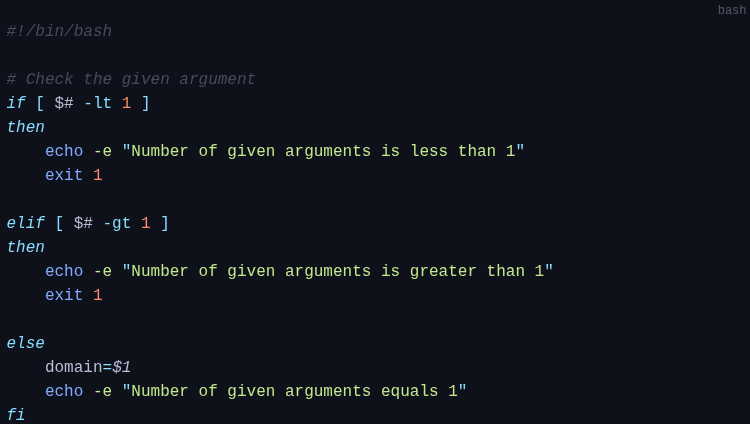
Comparing integer numbers can be very useful for us if we know what values we want to compare. Accordingly, we define the next steps and commands how the script should handle the corresponding value.
| Operator | Description |
|---|---|
-eq | is equal to |
-ne | is not equal to |
-lt | is less than |
-le | is less than or equal to |
-gt | is greater than |
-ge | is greater than or equal to |
 |
File Operators
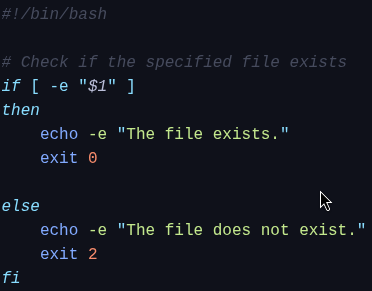
The file operators are useful if we want to find out specific permissions or if they exist.
| Operator | Description |
|---|---|
-e | if the file exist |
-f | tests if it is a file |
-d | tests if it is a directory |
-L | tests if it is if a symbolic link |
-N | checks if the file was modified after it was last read |
-O | if the current user owns the file |
-G | if the file’s group id matches the current user’s |
-s | tests if the file has a size greater than 0 |
-r | tests if the file has read permission |
-w | tests if the file has write permission |
-x | tests if the file has execute permission |
 |
Logical operators
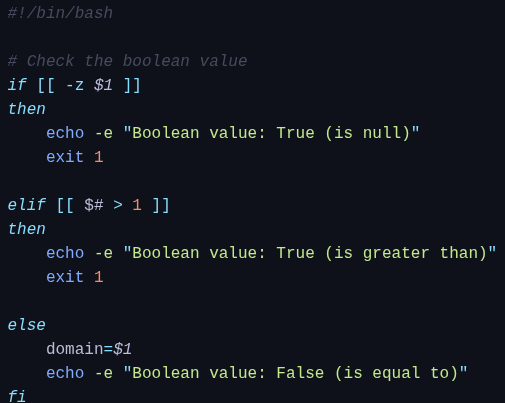
We get a boolean value "false" or "true" as a result with logical operators. Bash gives us the possibility to compare strings by using double square brackets [[ <condition> ]]. To get these boolean values, we can use the string operators. Whether the comparison matches or not, we get the boolean value "false" or "true".
Difference [] vs [[]]
- [] is a shell built-in command
#!/bin/bash
[ 3 -eq 3 ] && echo “Numbers are equal”
Numbers are equal
test 3 -eq 3 && echo “Numbers are equal”
Numbers are equal
- [[ is a shell keyword, convenient alternative to single brackets
$ [[ 1 < 2 ]] && echo “1 is less than 2”
1 is less than 2
[[: Opens the test command.- (Space) : Required separator at beginning and before end. "Hello"
- 1 first argument
Here, we checked whether 1 is less than 2 using the less than operator. The comparison was successful.
However, using single brackets instead of double brackets will give a syntax error:
$ [ 1 < 2 ] && echo “1 is less than 2”
bash: 2: No such file or directory
In this case, Bash treated the < operator as a file redirection operator. Therefore, we must use the escape character (__) before the < operator for a successful comparison within single brackets:
$ [ 1 \< 2 ] && echo “1 is less than 2”
1 is less than 2
Logical Operators
| Operator | Description |
|---|---|
! | logical negotation NOT |
&& | logical AND |
| | logical OR |
Exercise
Create an "If-Else" condition in the "For"-Loop that checks if the variable named "var" contains the contents of the variable named "value". Additionally, the variable "var" must contain more than 113,450 characters. If these conditions are met, the script must then print the last 20 characters of the variable "var". Submit these last 20 characters as the answer.
Code given:
#!/bin/bash

var="8dm7KsjU28B7v621Jls"
value="ERmFRMVZ0U2paTlJYTkxDZz09Cg"

for i in {1..40}
do
        var=$(echo $var | base64)

        #<---- If condition here:
done
Steps:
- Created a file called ex.sh using
vim ex.sh - Insert mode, paste given code, write and save using
:wq - Give execute permission using
chmod +x ex.sh var=$(echo $var | base64)takes the current text in variable $var and replace with base64 encoding.- Create a variable called
len=that calculates the number for char in the $var variable- ${#var} <-- standard way to get string length in BASH
- 2 joined conditions: - Check if var contains the text inside value, ** are wildcard for pattern searching
- checks $len is greater than 113450
- ${#var} <-- standard way to get string length in BASH
- Prints last 20 char using tail -c 20
-
- pipes the variable to the
tailcommand.
- pipes the variable to the
-c 20tellstailto output the last 20 bytes/characters.
-
Code :
#!/bin/bash

var="8dm7KsjU28B7v621Jls"
value="ERmFRMVZ0U2paTlJYTkxDZz09Cg"

for i in {1..40}
do
        # Encode in Base64
        var=$(echo $var | base64)
        # Get length of the encoded version
        len=${#var}

        #Check condition
        if [[ $var == *$value* ]] && [[ $len -gt 113450 ]]; then

        #print last 20 char
	        echo "$var" | tail -c 20
	        break
	    else
		    echo "Conditions not met"
		fi
done