Overview
We can imagine networking as the delivery of mail or packages sent by one computer and received by the other.
A network enables two computers to communicate with each other. There is a wide array of :
topologies(mesh/tree/star),mediums(ethernet/fiber/coax/wireless), andprotocols(TCP/UDP/IPX) that can be used to facilitate the network.
#networkOVERVIEW
We could consider a network subnet a street in a town (the corporate network), an IP address in that subnet assigned to a host as a house on that street, and logical ports as windows/doors that can be used to access the house.
Examples:
- ACL can be seen as fence around a house. They are a protective layer and creates specific entry and exit points. Someone can jump over but that would be a suspicious activity.
- Map out the network purpose can be seen as placing light bulbs at each position for better visibility
- Having bushes around windows is a deterrent to people attempting to open the window. Just like Intrusion Detection Systems like Suricata or Snort are a deterrent to running network scans.
- Our post office is our
routerwhich we utilize to connect to the "Internet" in networking.- As soon as we send our packet through our post office (
router), the packet is forwarded to themain post office(ISP). This main post office looks in theaddress register/phonebook(Domain Name Service) where this address is located and returns the corresponding geographical coordinates (IP address). Now that we know the address's exact location, our packet is sent directly there by a direct flight via our main post office.
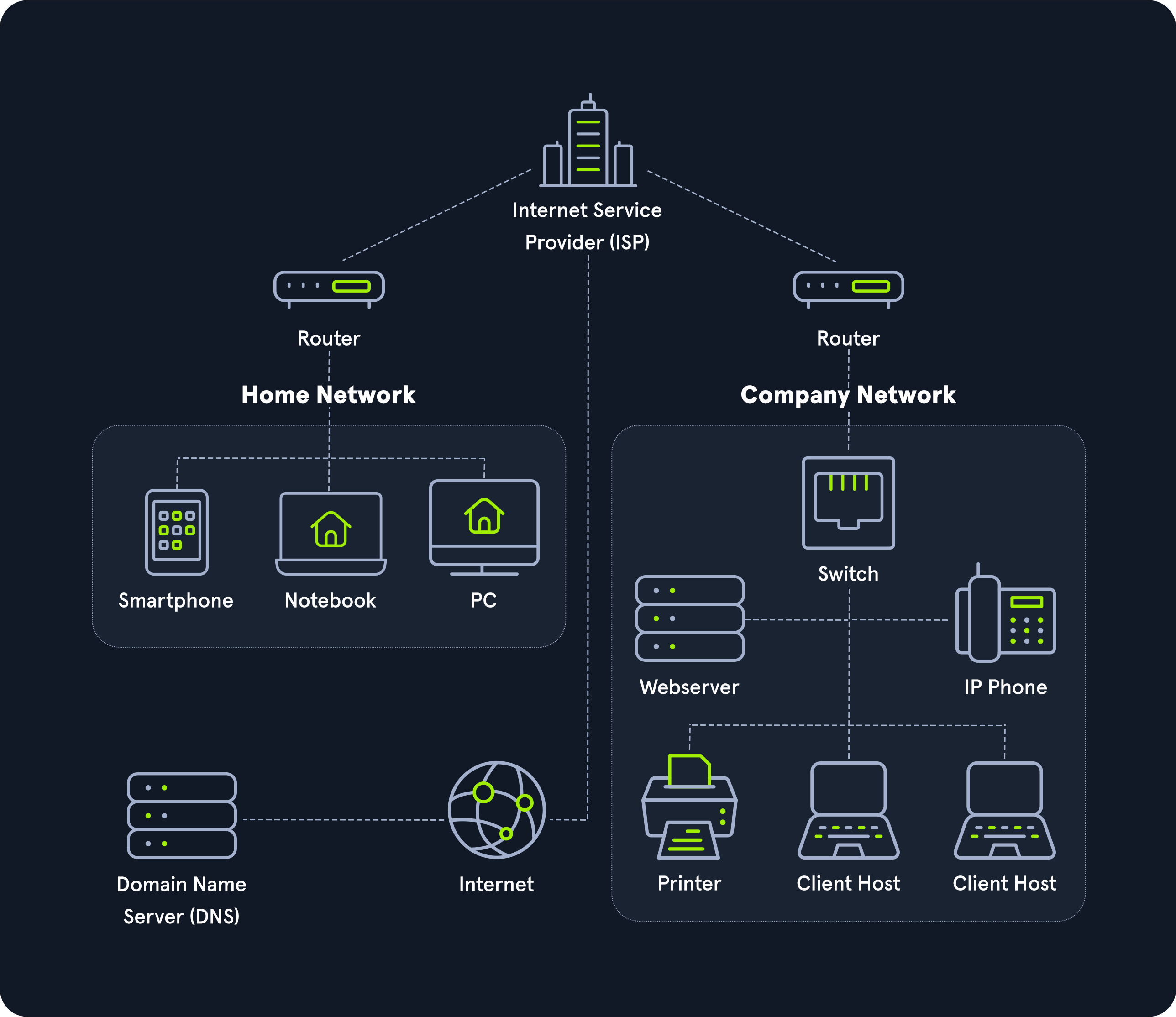
- As soon as we send our packet through our post office (
- The Web Server should be in a DMZ (Demilitarized Zone) because clients on the internet can initiate communications with the website, making it more likely to become compromised. Placing it in a separate network allows the administrators to put networking protections between the web server and other devices.
- Workstations should be on their own network. If a Workstation is on the same network as a Server, networking attacks like
spoofingorman in the middlebecome much more of an issue. - The Switch and Router should be on an "Administration Network." This prevents workstations from snooping in on any communication between these devices. Since the router did not have a
trusted network, anyone on the internal network could have sent a malicious advertisement and performed aman in the middleattack against any network. - IP Phones should be on their own network. Placing them on their own network can allow network administrators to prioritize their traffic to prevent high latency more easily.
- Printers should be on their own network. This may sound weird, but it is next to impossible to secure a printer. Due to how Windows works, if a printer tells a computer authentication is required during a print job, that computer will attempt an
NTLMv2authentication, which can lead to passwords being stolen. Additionally, these devices are great for persistence and, in general, have tons of sensitive information sent to them.