File descriptors
A file descriptor (FD) in Unix/Linux operating systems is a reference, maintained by the kernel, that allows the system to manage Input/Output (I/O) operations.
It acts as a unique identifier for an open file, socket, or any other I/O resource.
the file descriptor is the system's way of keeping track of active I/O connections, such as reading from or writing to a file.
Example:
Ticket when you check you coat in an event.
FD: Ticket
I/O ops: Coat checking , Coat retrieval
Attendant : OS doing the coat handling
By default, the first three file descriptors in Linux are:
- Data Stream for Input
STDIN – 0
- Data Stream for Output
STDOUT – 1
- Data Stream for Output that relates to an error occurring.
STDERR – 2
sosoBoy@htb[/htb]$ find /etc/ -name shadow
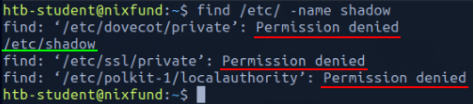
Green : STDOUT
Red : STDERR
sosoBoy@htb[/htb]$ find /etc/ -name shadow 2>/dev/null
This way, we redirect the resulting errors to the "null device," which discards all data.
In combination with the file descriptors, we can redirect errors and output with greater-than character (>).
Redirect STDOUT to a File
sosoBoy@htb[/htb]$ find /etc/ -name shadow 2>/dev/null > results.txt

The only result we see now is the standard output (STDOUT), which we can also redirect to a file with the name results.txt that will only contain standard output without the standard errors.
This can be ri-directed separately as well:
sosoBoy@htb[/htb]$ find /etc/ -name shadow 2> stderr.txt 1> stdout.txt
Redirect STDIN
The lower-than sign serves as standard input (FD 0 - STDIN). These characters can be seen as "direction" in the form of an arrow that tells us "from where" and "where to" the data should be redirected. We use the cat command to use the contents of the file "stdout.txt" as STDIN.
sosoBoy@htb[/htb]$ cat < stdout.txt
Redirect STDOUT and Append to a File
When we use the greater-than sign (>) to redirect our STDOUT, a new file is automatically created if it does not already exist. If this file exists, it will be overwritten without asking for confirmation. If we want to append STDOUT to our existing file, we can use the double greater-than sign (>>).
sosoBoy@htb[/htb]$ find /etc/ -name passwd >> stdout.txt 2>/dev/null
EndOfFile to re-visit
EOF represents the end of an input file, or an error indication.
It is a negative value, of type int.
EOF function of a Linux system file, which defines the input's end.
#!/bin/bash
cat <<EOF
Hello world!
This is a heredoc.
EOF
Pipes
Another way to redirect STDOUT is to use pipes (|). Very useful when we want to use an output from one program to be processed by another.
The most commonly tool used in combination with pipes is grep. Grep is used to filter STDOUT according to the pattern we define. *grep provides a wide range of powerful features for pattern searching. *
sosoBoy@htb[/htb]$ find /etc/ -name *.conf 2>/dev/null | grep systemd

For the next example, we will use the tool called wc, which should count the total number of obtained results.
sosoBoy@htb[/htb]$ find /etc/ -name *.conf 2>/dev/null | grep systemd | wc -l
List installed packages in a system
apt list --installed | grep -c 'installed'
Where list installed shows all the installed packages, piped into grep that uses flag -c to count the list.
More, Less, Head, Tail,Sort
There are two powerful tools for this - more and less. These are known as pagers, and they allow you to view the contents of a file interactively, one screen at a time.
The /etc/passwd file in Linux is like a phone directory for users on the system. It includes details such as the username, user ID, group ID, home directory, and the default shell they use.
sosoBoy@htb[/htb]$ cat /etc/passwd | more
Less is almost the same as more.
Head
Sometimes we will only be interested in specific issues either at the beginning of the file or the end. If we only want to get the first lines of the file, we can use the tool head.
cat /home/text.txt head
Tail
It shows the last 10 lines of a file.
Sort
Often it is necessary to sort the desired results alphabetically or numerically to get a better overview. For this, we can use a tool called sort.
cat /etc/passwd | sort
Grep:
When looking for specific patterns to find a file, the most powerful tool that is used is grep
example: Users that have default $SHELL set to /bin/bash.
sosoBoy@htb[/htb]$ cat /etc/passwd | grep -v "false\|nologin"

root:x:0:0:root:/root:/bin/bash
sync:x:4:65534:sync:/bin:/bin/sync`
Replace delimiters with cut or tr
Specific results with different characters may be separated as delimiters.
To remove these, we can use cut with flag -d and set the delimiter to the colon character (:) and define with the option "-f" the position in the line we want to output.

Here -f7 shows the last element marked by the delimiter.
tr
Another way to do this is tr

Column
Since search results can often have an unclear representation, the tool column is well suited to display such results in tabular form using the "-t

AWK
awk programming is beneficial, which allows us to display the first ($1) and last ($NF) result of the line.

sed
sed is one of the most common uses of this is substituting text. Here, sed looks for patterns we have defined in the form of regular expressions (regex) and replaces them with another pattern that we have also defined.
Let's swap bin with 0x:
The "s" flag at the beginning stands for the substitute command. Then we specify the pattern we want to replace, (/), we enter the pattern we want to use as a replacement in the third position. Finally, we use the "g" flag, which stands for replacing all matches.

(This is not permanently changed)
Wc
Use the tool wc. With the "-l" option, we specify that only the lines are counted.
Exercises:
| 1. | A line with the username cry0l1t3. | cat /etc/passwd | grep 'cry0l1t3' | Tip |
|---|---|---|---|
| 2. | The usernames. | cat /etc/passwd | cut -d':' -f1 | used cut |
| 3. | The username cry0l1t3 and his UID. | cat /etc/passwd | grep 'cry0l1t3' | cut -d':' -f1-3 | Used cut |
| 4. | The username cry0l1t3 and his UID separated by a comma (,). | cat /etc/passwd | grep 'cry0l1t3' | cut -d':' -f1-3 | tr ':' ',' | cut tr |
| 5. | The username cry0l1t3, his UID, and the set shell separated by a comma (,). | cat /etc/passwd | grep 'cry0l1t3' | cut -d':' -f1-3,7 | tr ':' ',' | cut but field range -f1-3,7 (from 1 to 3 and then 7) |
| 6. | All usernames with their UID and set shells separated by a comma (,). | cat /etc/passwd | cut -d':' -f1,7 | tr ':' ',' | |
| 7. | All usernames with their UID and set shells separated by a comma (,) and exclude the ones that contain nologin or false. | cat /etc/passwd|grep -v "false|nologin"|cut -d':' -f1,7|tr ':' ','<br> | grep -v where -v shows lines that do not contain the pattern------------- | means OR |
| 8. | All usernames with their UID and set shells separated by a comma (,) and exclude the ones that contain nologin and count all lines of the filtered output. | cat /etc/passwd|grep -v "nologin"|cut -d':' -f1,7|tr ':' ','| wc -l |