System logs
System logs on Linux are a set of files that contain information about the system and the activities taking place on it.
These system logs can be a valuable source of information for identifying potential security weaknesses and vulnerabilities within a Linux system as well.
By analyzing the logs on our target systems, we can:
- can gain insights into the system's behavior,
- check network activity and user activity
- identify any abnormal activities such as :
- such as unauthorized logins,
- attempted attacks,
- clear text credentials,
- or unusual file access, which could indicate a potential security breach.
#pentest
As penetration testers, can also use system logs to monitor the effectiveness of our security testing activities.
There are several different types of system logs on Linux, including:
- Kernel Logs
- System Logs
- Authentication Logs
- Application Logs
- Security Logs
Kernel logs
These logs contain information about the system's kernel, including hardware drivers, system calls, and kernel events. They are stored in the /var/log/kern.log file.
Kernel logs can help us identify suspicious system calls or other activities that could indicate the presence of malware or other malicious software on the system.
System logs
These logs contain information about system-level events, such as service starts and stops, login attempts, and system reboots. They are stored in the /var/log/syslog file.
Use the syslog to identify potential issues that could impact the availability or performance of the system, such as failed service starts or system reboots.
Authentication logs
These logs contain information about user authentication attempts, including successful and failed attempts. They are stored in the /var/log/auth.log file.
It is important to note that while the /var/log/syslog file may contain similar login information, the /var/log/auth.log file specifically focuses on user authentication attempts, making it a more valuable resource for identifying potential security threats.
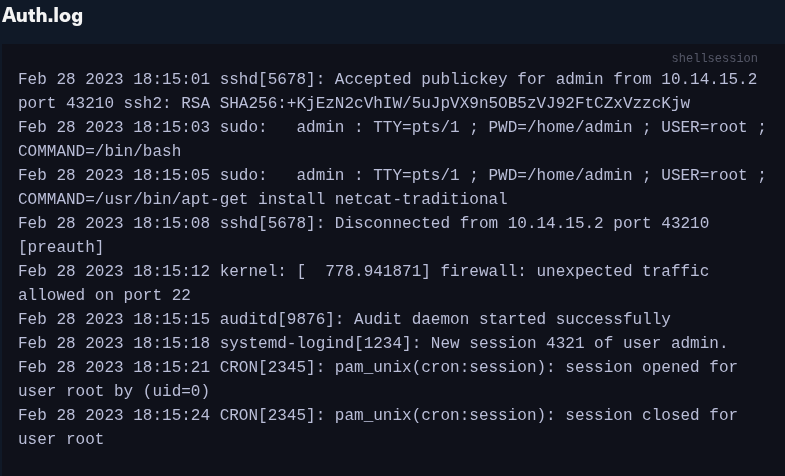
In this example, we can see in the first line that a successful public key has been used for authentication for the user admin. Additionally, we can see that this user is in the sudoers group because he can execute commands using sudo. The kernel message indicates that unexpected traffic was allowed on port 22, which could indicate a potential security breach. After that, we see that a new session was created for user "admin" by systemd-logind and that a cron session opened and closed for the user root.
Application logs
These logs contain information about the activities of specific applications running on the system. They are often stored in their own files, such as /var/log/apache2/error.log for the Apache web server or /var/log/mysql/error.log for the MySQL database server.
access logs keep a record of user and process activity on the system, including login attempts, file accesses, and network connections. Audit logs record information about security-relevant events on the system, such as modifications to system configuration files or attempts to modify system files or settings. These logs help track potential attacks and activities or identify security breaches or other issues.
Access Log Entry
2023-03-07T10:15:23+00:00 servername privileged.sh: htb-student accessed /root/hidden/api-keys.txt
On Linux systems, most common services have default locations for access logs:
#services
| Service | Description |
|---|---|
Apache | Access logs are stored in the /var/log/apache2/access.log file (or similar, depending on the distribution). |
Nginx | Access logs are stored in the /var/log/nginx/access.log file (or similar). |
OpenSSH | Access logs are stored in the /var/log/auth.log file on Ubuntu and in /var/log/secure on CentOS/RHEL. |
MySQL | Access logs are stored in the /var/log/mysql/mysql.log file. |
PostgreSQL | Access logs are stored in the /var/log/postgresql/postgresql-version-main.log file. |
Systemd | Access logs are stored in the /var/log/journal/ directory. |
Security logs
These security logs and their events are often recorded in a variety of log files, depending on the specific security application or tool in use.
It is important to be familiar with the default locations for access logs and other log files on Linux systems, as this information can be useful when performing a security assessment or penetration test. By understanding how security-related events are recorded and stored, we can more effectively analyze log data and identify potential security issues.