Services and Processes
Linux services are known as daemons, which run run silently in the background. These are identified with the letter d at the end of their program name: such as sshd (SSH daemon) or systemd
System Services
These are internal services required during system startup. (Imagine a car: this would be the engine )
User-Installed Services
These services are added by users and typically include server applications and other background processes that provide specific features or capabilities. (In a car this would be the GPS or AC , which are additional services)
Most modern Linux distributions have adopted systemd as their initialization system (init system). It is the first process that starts during the boot process and is assigned the Process ID (PID). All processes in a Linux system are assigned a PID and can be viewed under the /proc/ directory, which contains information about each process. Processes may also have a Parent Process ID (PPID), indicating that they were started by another process (the parent), making them child processes.
There are just a few goals that we have when we deal with a service or a process:
- Start/Restart a service/process
- Stop a service/process
- See what is/was happening with a service/process
- Enable/Disable a service/process on boot
- Find a service/process
systemctl start ssh
systemctl status ssh
systemctl enable ssh
We can also use systemctl to list all services:
sosoBoy@htb[/htb]$ systemctl list-units --type=service
Process
A process can be in the following states:
- Running
- Waiting (waiting for an event or system resource)
- Stopped
- Zombie (stopped but still has an entry in the process table).
Processes can be controlled using kill, pkill, pgrep, and killall. To interact with a process, we must send a signal to it. We can view all signals with the following command:
kill -l
The most commonly used signals are:
| Signal | Description |
|---|---|
1 | SIGHUP - This is sent to a process when the terminal that controls it is closed. |
2 | SIGINT - Sent when a user presses [Ctrl] + C in the controlling terminal to interrupt a process. |
3 | SIGQUIT - Sent when a user presses [Ctrl] + D to quit. |
9 | SIGKILL - Immediately kill a process with no clean-up operations. |
15 | SIGTERM - Program termination. |
19 | SIGSTOP - Stop the program. It cannot be handled anymore. |
20 | SIGTSTP - Sent when a user presses [Ctrl] + Z to request for a service to suspend. The user can handle it afterward. |
Example : kill 9 <PID> |
Execute Multiple Commands
There are three possibilities to run several commands, one after the other. These are separated by:
-
Semicolon (
;)- The semicolon (
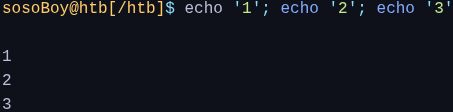
;) is a command separator and executes the commands by ignoring previous commands' results and errors.
- The semicolon (
-
Double
ampersandcharacters (&&)- If there is an error in one of the commands, the following ones will not be executed anymore, and the whole process will be stopped.

- If there is an error in one of the commands, the following ones will not be executed anymore, and the whole process will be stopped.
-
Pipes (
|) depend not only on the correct and error-free operation of the previous processes but also on the previous processes' results.
Task scheduling
Task scheduling is a critical feature in Linux systems that allows users and administrators to automate tasks by running them at specific times or regular intervals, eliminating the need for manual initiation.
==Task scheduling in general is like setting a coffee or tea maker to brew automatically each morning. Once programmed, it prepares coffee or tea at the desired time without further intervention, ensuring a fresh cup is ready when you need it.
- Understanding task scheduling in Linux systems is essential for us as cybersecurity specialists and penetration testers because it can serve both as a legitimate administrative tool and a vector for malicious activity.
- Knowledge of how tasks are automated allows you to identify potential security risks, such as unauthorized cron jobs that execute harmful scripts or maintain persistent backdoors at scheduled intervals.
- By comprehending the intricacies of task scheduling, you can detect and analyze these hidden threats, enhance system audits, and even utilize scheduled tasks to simulate attack scenarios during penetration testing.
Systemd
Systemd is a service used in Linux systems such as Ubuntu, Redhat Linux, and Solaris to start processes and scripts at a specific time.
With it, we can set up processes and scripts to run at a specific time or time interval and can also specify specific events and triggers that will trigger a specific task.
- Create a timer (schedules when your
mytimer.serviceshould run) - Create a service (executes the commands or script)
- Activate the timer
Cron
Cron is another tool that can be used in Linux systems to schedule and automate processes. The process for setting up the Cron daemon is a little different than Systemd. To set up the cron daemon, we need to store the tasks in a file called crontab and then tell the daemon when to run the tasks.
The key difference between these two tools is how they are configured. With Systemd, you need to create a timer and services script that tells the operating system when to run the tasks. On the other hand, with Cron, you need to create a crontab file that tells the cron daemon when to run the tasks.