Linux Security
#linuxsecurity
Linux systems are also less prone to viruses that affect Windows operating systems and do not present as large an attack surface as Active Directory domain-joined hosts. Regardless, it is essential to have certain fundamentals in place to secure any Linux system.
- One of the most important security measure is to keep the kernel up to date:
sudo apt update
sudo apt upgrade
- If firewall rules are not appropriately set at the network level, we can use the Linux firewall and/or
iptablesto restrict traffic into/out of the host.- iptables became the de facto standard firewall solution for Linux systems
- iptables utility provided a simple yet powerful command-line interface for configuring firewall rules
- Disallow root user to access from logging via SSH.
- Users' access should be determined based on the principle of least privilege.
- They should have the privilege specified in the
sudoersfile instead of full sudo rights
Besides, there are different applications and services such as Snort, chkrootkit, rkhunter, Lynis, and others that can contribute to Linux's security.
some security settings should be made, such as:
- Removing or disabling all unnecessary services and software
- Removing all services that rely on unencrypted authentication mechanisms
- Ensure NTP is enabled and Syslog is running
- NTP is an internet protocol that’s used to synchronise the clocks on computer networks to within a few milliseconds of universal coordinated time (UTC). It enables devices to request and receive UTC from a server that, in turn, receives precise time from an atomic clock.
- Syslog is the de facto standard protocol for centralizing system and event logs from diverse devices and applications, enabling organizations to efficiently monitor, troubleshoot, and secure their IT environments.
- Ensure that each user has its own account
- Enforce the use of strong passwords
- Set up password aging and restrict the use of previous passwords
- Locking user accounts after login failures
- Disable all unwanted SUID/SGID binaries
TCP Wrappers
Is a security precaution in Linux systems that allows sysadmin to control which services are allowed to access the system.
It works by restricting access to certain services based on the hostname or IP address of the user requesting access.
When a client attempts to connect to a service the system will first consult the rules defined in the TCP wrappers configuration files to determine the IP address of the client. If the IP address matches the criteria specified in the configuration files, the system will then grant the client access to the service. However, if the criteria are not met, the connection will be denied, providing an additional layer of security for the service.
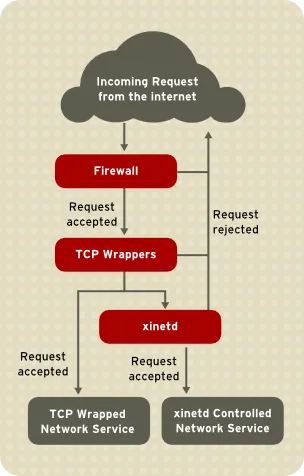
TCP wrappers use the following configuration files:
/etc/hosts.allow/etc/hosts.deny
In short, the /etc/hosts.allow file specifies which services and hosts are allowed access to the system, whereas the /etc/hosts.deny file specifies which services and hosts are not allowed access. These files can be configured by adding specific rules to the files.
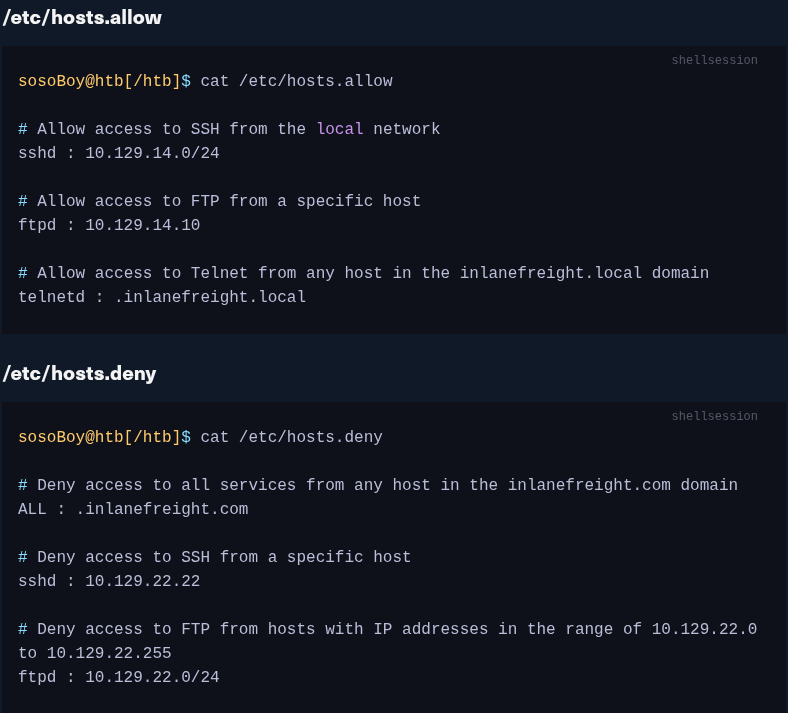
IMPO
It is important to remember that the order of the rules in the files is important. The first rule that matches the requested service and host is the one that will be applied. It is also important to note that TCP wrappers are not a replacement for a firewall, as they are limited by the fact that they can only control access to services and not to ports.