Interfaces
The command ifconfig is to visualise all the network interfaces and display their status.
The flag -a will display all the interfaces, including those down.
After running the command, there are many interfaces shown:
[macOS]
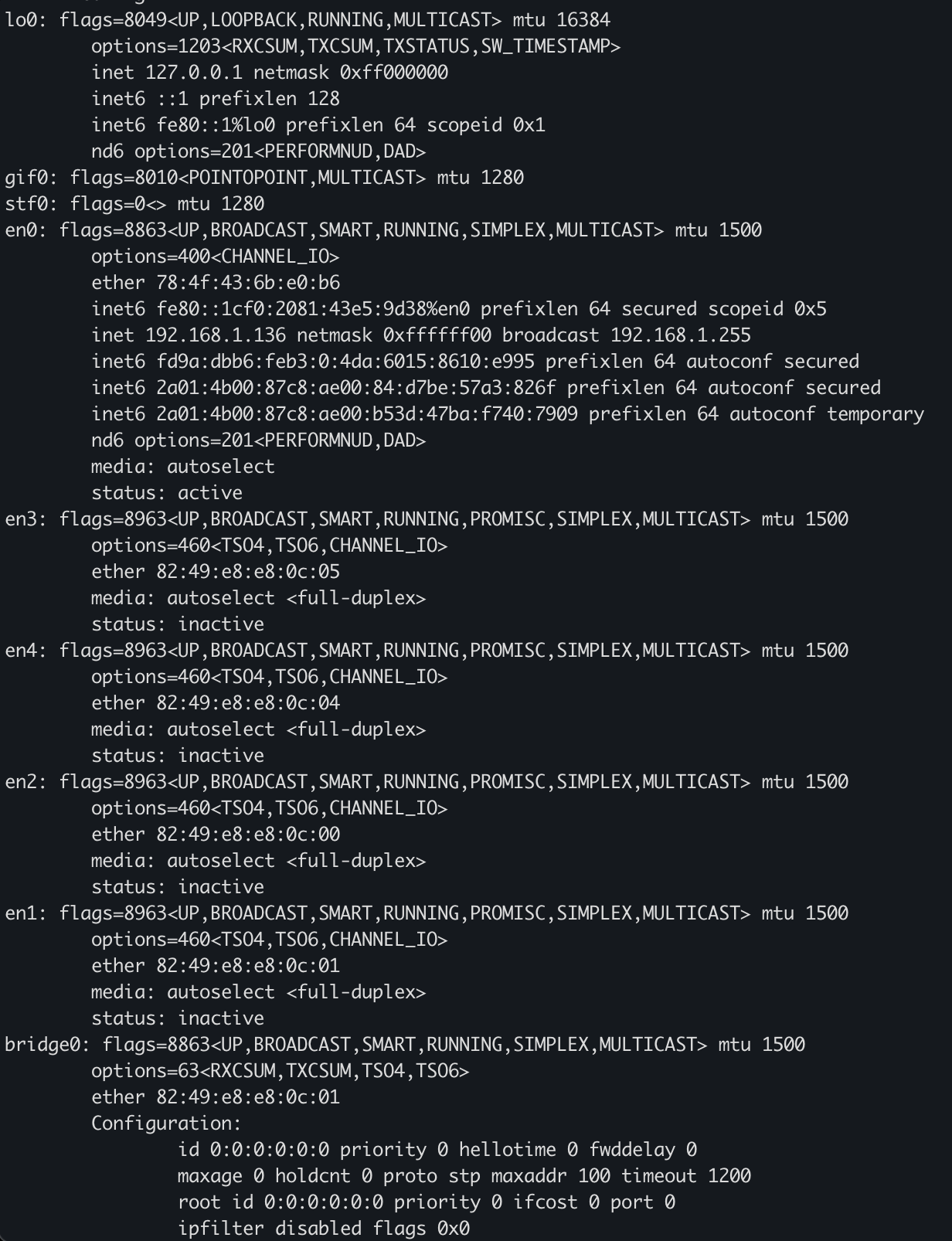
| Interface | Function | Explanation |
|---|---|---|
| lo0 — Loopback Interface | - Purpose: Internal communication with your own machine - Used by: Local services, testing, databases, localhost servers | loopback address, and it is always associated to the IPv4 address 127.0.0.1.It's often used for testing, as a way to make sure an application is working as intended Credentials and session cookies are typically stored in a database. Rather than have the database exposed to the public, it can only be accessed by the server itself. |
| tun0 - Tunnel | - Virtual tunnel interfaces | Created by: - VPN clients |
| en0 | Main Network Interface (Wi-Fi or Ethernet) | This is the primary internet network interface. |
| en1, en2, en3, en4 | Additional Ethernet Interfaces | They are: - In PROMISC mode - Added to bridge0 - Status: inactive Summary: Used for bridging/virtual networking (VMs, Docker, Hypervisor, etc.) |
| bridge0 — Network Bridge | - Bridges en1–en4 together | Virtual switch connecting multiple interfaces together. |
What do the other components mean?
| Flag | Seen On | Meaning |
|---|---|---|
| UP | Many interfaces | Interface enabled |
| RUNNING | Many interfaces | Interface operational |
| BROADCAST | enX | Supports broadcast traffic |
| MULTICAST | Most | Supports multicast traffic |
| LOOPBACK | lo0 | Localhost interface |
| POINTOPOINT | utunX, gif0 | Tunnel/VPN interface |
| SMART | enX | macOS smart interface handling |
| SIMPLEX | enX | Cannot receive its own packets |
| PROMISC | en1–en4, awdl0 | Promiscuous mode (packet capture / bridge / virtualization) |
netstat
It displays network connections, routing tables, and interface statistics.
Check route taken from one machine to another:
ip route get <target ip>
Interact with a machine with ping:
It is a networking utility used to test the reachability of a host on a network. (Layer 3 , it uses IP)
ping -c 4 <target ip>
-c 4 specifies the count of the ping, otherwise it would send pings indefinitely.
ping -c4 10.129.233.197

PING 10.129.233.197 (10.129.233.197) 56(84) bytes of data.
64 bytes from 10.129.233.197: icmp_seq=1 ttl=127 time=71.6 ms
64 bytes from 10.129.233.197: icmp_seq=2 ttl=127 time=71.3 ms
64 bytes from 10.129.233.197: icmp_seq=3 ttl=127 time=71.8 ms
64 bytes from 10.129.233.197: icmp_seq=4 ttl=127 time=71.2 ms

--- 10.129.233.197 ping statistics ---
4 packets transmitted, 4 received, 0% packet loss, time 3003ms
rtt min/avg/max/mdev = 71.205/71.470/71.776/0.223 ms
- Time to live - ttl : tells how many "hops" our packets are allowed to take in order to reach the target. This rarely applies to devices on the same local network as us, but rather devices on the internet that require our packets to hop through multiple routers in order to reach their intended destination.
- time : gives an idea of how much latency there is on the network