SQL
A database is a software running somewhere, inside where there is a lot of data.
As the data inside a database grows, it can creates bottlenecks. To handle this, engineers use techniques like :
- Partitioning,
- Sharding,
- separating read and write operation through replicas.
This keeps the system responsive under heavy load.
To manipulate data in a database:
- An RDBMS database program (i.e. MS Access, SQL Server, MySQL, sqlite3)
- The data in RDBMS is stored in database objects called tables.
The language to manipulate a database is called: SQL (Structured Query Language) , a declaretive which supports 4 operations:
- Create ()
- Read (Select)
- Update
- Delete
Create Database:
For learning, I am using sqlite3
Create a sqlite3 database : sqlite3 customers.db ;
- Any command that starts with dot
.is a sqlite command;.mode csv.import customers-100.csv customers.quit
Check DB created successfully:sqlite customers.db.schema
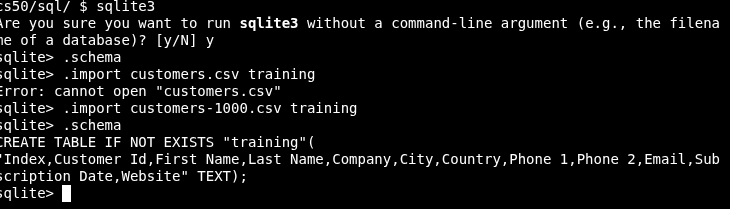
Default table created by sqlite3
sqlite training.db
###### Commands // select all - `SELECT * FROM tableName;` // select 2 columns - `select country, full name from customers;` // COUNT element in a row - `select count(fullname) from customers;` // UNIQUE list of elements - `select distinct(country) from customer`; // count number of DISTINCT elements - `select count(distinct country) from customer`;
// WHERE clause to find specific data
SELECT COUNT(*) FROM customers WHERE Country = 'China';
// WHERE + AND clauseS to find specific data
SELECT COUNT(*) FROM customers WHERE Country = 'China' AND Company = 'Welchton';
- IN SQL , THE ESCAPE CHARACTER IS
'' - In SQL, if a column name contains spaces, you need to enclose it in double quotes.
Pattern Match : like
! TOLERATES CASE INSENSITIVITY
// LIKE clause to check COUNT for a pattern
SELECT COUNT(*) FROM customers WHERE Company like 'Wel%';
// Like clause to check all value for a pattern
SELECT * FROM customers WHERE Company like 'Wel%';
Group BY:
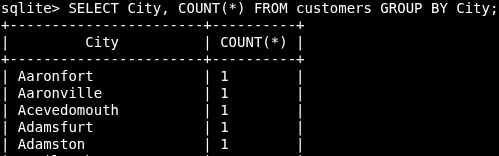
Look at the column city, group all the common element in the column and figure out their count for all the grouped rows:
SELECT City, COUNT(*) FROM customers GROUP BY City;
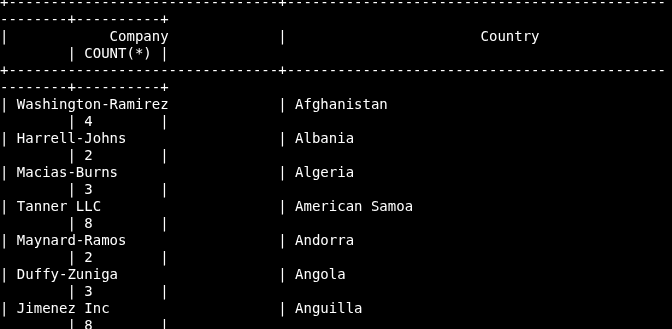
SELECT Company,City, COUNT(*) FROM customers GROUP BY Country;
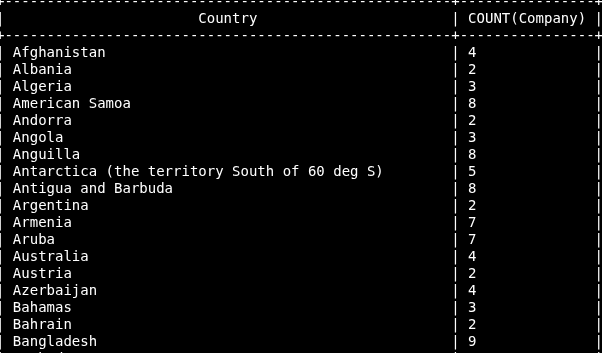
SELECT Country, COUNT(Company) FROM customers GROUP BY Country;
Order By:
Pretty much same as group by, except the order keywords (ASC | DESC) go at the end:
// Order count of companies in a descending order:
`SELECT Country, COUNT(Company) FROM customers GROUP BY Country ORDER BY COUNT(Company) DESC
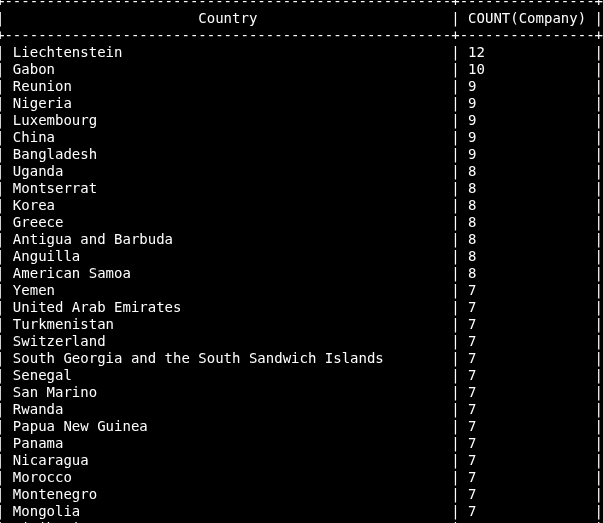
// Order by country in descending order
SELECT Country, COUNT(Company) FROM customers GROUP BY Country ORDER BY Country DESC
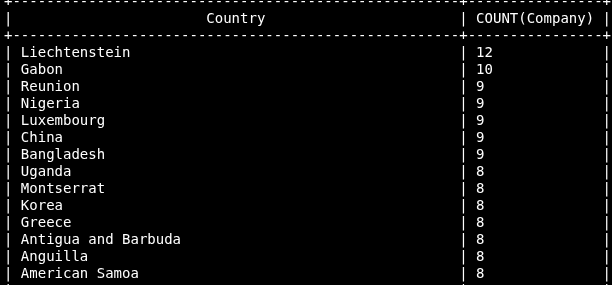
OR we can alias COUNT(Company) as Company Number
Table Manipulation = CURD operations (Create,Insert, Delete, Update)
// Insert row into the table
INSERT INTO customers ("First Name", "Last Name") VALUES ('SOSO', 'NONO');
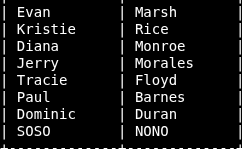
// Delete the same values
DELETE FROM customers where "First Name" = "SOSO" AND "Last Name" = "NONO";`
// Update table, following a key-value logic with a condition
sqlite> UPDATE customers SET "First Name" = "SOSO", "Last Name" = "NONO";
sqlite> SELECT "First Name", "Last Name" from customers;
// Cancel table
DROP TABLE customers;
Normalization:
- In DB normalization is the process of eliminating redundant data.
- A table can have an UNIQUE identifier where there cannot be NULL vales.
- A table must have a PRIMARY KEY.
- Another table can have as a reference the primary key from the main table, this is called a Foreign key.
Join statements:
Check all the tables in sqlite3 --> .tables
I have created 3 tables in the database : AGENTS, ORDERS, CUSTOMERS (Yes, all uppercase)
- Check table structure with
.schema
sqlite> .schema CUSTOMER
CREATE TABLE IF NOT EXISTS "CUSTOMER"
   ("CUST_CODE" VARCHAR2(6) NOT NULL PRIMARY KEY,           # Primary Key
"CUST_NAME" VARCHAR2(40) NOT NULL,
"CUST_CITY" CHAR(35),
"WORKING_AREA" VARCHAR2(35) NOT NULL,
"CUST_COUNTRY" VARCHAR2(20) NOT NULL,
"GRADE" NUMBER,
"OPENING_AMT" NUMBER(12,2) NOT NULL,
"RECEIVE_AMT" NUMBER(12,2) NOT NULL,
"PAYMENT_AMT" NUMBER(12,2) NOT NULL,
"OUTSTANDING_AMT" NUMBER(12,2) NOT NULL,
"PHONE_NO" VARCHAR2(17) NOT NULL,
"AGENT_CODE" CHAR(6) NOT NULL REFERENCES AGENTS
);
sqlite> .schema ORDERS
CREATE TABLE IF NOT EXISTS "ORDERS"
   (
        "ORD_NUM" NUMBER(6,0) NOT NULL PRIMARY KEY,
"ORD_AMOUNT" NUMBER(12,2) NOT NULL,
"ADVANCE_AMOUNT" NUMBER(12,2) NOT NULL,
"ORD_DATE" DATE NOT NULL,
"CUST_CODE" VARCHAR2(6) NOT NULL REFERENCES CUSTOMER,        # Foreign Key
"AGENT_CODE" CHAR(6) NOT NULL REFERENCES AGENTS,
"ORD_DESCRIPTION" VARCHAR2(60) NOT NULL
   );
So I checked specific rows from 2 tables, and I use the PK & FK to JOIN both tables:
- Per convention the main table's PK has a normale nome
- Another table using as FK the main table's PK shows
REFERENCE
sqlite> SELECT "ORD_DATE", "CUST_NAME" from ORDERS
   ...> JOIN CUSTOMER ON ORDERS.CUST_CODE = CUSTOMER.CUST_CODE
   ...> LIMIT 10;
+------------+-------------+
|  ORD_DATE  |  CUST_NAME  |
+------------+-------------+
| 04/15/2008 | Yearannaidu |
| 08/30/2008 | Ramanathan  |
| 05/30/2008 | Venkatpati  |
| 06/10/2008 | Avinash     |
| 05/25/2008 | Steven      |
| 08/15/2008 | Bolt        |
| 09/16/2008 | Martin      |
| 07/20/2008 | Karl        |
| 09/16/2008 | Ramanathan  |
| 09/23/2008 | Karolina    |
+------------+-------------+